Copied URL to clipboard!

Later's Social Media Tools & Features

How to schedule social media posts at scale in 2026


Updated on March 31, 2026
15 minute read

Save time and increase your efficiency 🚀

Published March 31, 2026
Share

If you're a busy social media manager or creator, finding time to regularly post on all of your social channels can be challenging.

That's where a social media scheduler comes in handy.

With it, you can plan all of your posts from one centralized dashboard, write out your captions, and schedule your content in advance.

The result? Time saved, an organized content calendar, and a consistent posting cadence.

We're sharing how to schedule your social posts without all the labor-intensive work, plus six best practices and even a free social media content calendar template approved by Later's social team.

Never Miss a Trend Again

Join over 1 million marketers to get social news, trends, and tips right to your inbox!

Email Address

TL;DR

  • A social media scheduler lets you plan, create, and publish content across multiple platforms from one dashboard, saving you hours of manual posting time

  • The best schedulers offer multi-platform support, a visual content calendar, auto-publishing, analytics, and team collaboration features, everything you need in one place

  • To choose the right tool, think about your team size, which platforms matter most to you, and whether you need advanced features like AI captions or approval workflows

  • Later supports scheduling for Instagram, TikTok, Facebook, LinkedIn, Pinterest, YouTube, and Threads, all with a visual calendar and auto-publish to make your life easier

What is a social media scheduler?

A social media scheduler is a tool that lets you plan, create, and publish content across multiple platforms from one centralized dashboard. Instead of logging into each platform separately and posting in real time, you can batch your work and let the scheduler handle the rest.

Most social media scheduling tools offer core capabilities like:

  • You can publish to multiple platforms from a single interface

  • A visual content calendar lets you see your entire posting schedule at a glance

  • Auto-publish functionality means your posts go live without manual intervention

  • Media libraries help you store and organize your photos and videos in one place

  • Analytics let you track what's working and what isn't

Think of it as mission control for your social presence. You do the creative work upfront, and the scheduler makes sure it reaches your audience at the right time, on the right platform.

Why use a social media scheduler instead of posting manually?

Scheduling social media posts in advance comes with real benefits. Here are the ones that matter most:

Save time and set work-life boundaries

Manually posting all of your social content can be a time-consuming process, especially when you have other business tasks to check off your list.

But when you schedule all of your content in advance, you save hours every week. It also leaves room to focus on other tasks like building out your monthly report, creating content, or diving into your analytics.

Plus, it means that when you close your laptop for the day, you can actually log off. No late-night posting required.

Post consistently across all platforms

Ask anyone who works in social media, and they'll say one key reason for their success is having a consistent posting cadence.

While it doesn't have to be every day (we know that's not always realistic), it's important to post content throughout the week that your audience can engage with. Unsure how often to post on platforms like Instagram? We analyzed over 22M posts to find out the ideal posting cadence. Here's how often you should post on Instagram every week.

With scheduling, you can ensure that you're posting to all important channels and no platform gets left behind. And if you discover your personalized best times to post, you're guaranteed to maximize engagement based on when your followers are online the most.

Keep your content calendar organized

When you use one content calendar, you'll have a holistic view of all your content. Having it all in one place helps you spot any gaps or opportunities for the upcoming weeks.

It's an easy and effective way to make sure you aren't posting for the sake of posting, and that your content is always on point across all channels.

Download our free ready-to-use social media calendar template to streamline your social media strategy today.

Best social media scheduling tools for 2026

The right social media scheduler depends on your team size, budget, and the platforms you prioritize. Here's how the top options stack up:

Tool

Platforms Supported

Starting Price

Best For

Later

Instagram, TikTok, Facebook, LinkedIn, Pinterest, YouTube, Threads

Free plan available

Visual-first brands and creators

Sprout Social

Instagram, Facebook, LinkedIn, X, Pinterest, TikTok, YouTube

$199/month

Enterprise teams needing robust analytics

Hootsuite

Instagram, Facebook, LinkedIn, X, Pinterest, TikTok, YouTube

$99/month

Teams managing high-volume accounts

Buffer

Instagram, Facebook, LinkedIn, X, TikTok, Pinterest

Free plan available

Small teams and solopreneurs

Later

Later's scheduling platform lets you plan and schedule your Instagram, Facebook, TikTok, LinkedIn, Pinterest, YouTube, and Threads content so you can spend less time manually posting and more energy on your business and community.

Standout features:

  • The Visual Planner lets you preview your feed before posting

  • In-depth analytics help you optimize performance over time

  • The Link in Bio tool lets you create a landing page with clickable buttons and linked feed posts

  • The AI Caption Writer generates captions quickly when you're stuck

Whether you're a solopreneur or managing multiple brand accounts, Later's social media management tools can help you save valuable time so you can focus on other areas of your business. You can get started with a 14-day trial for free.

Sprout Social

Sprout Social is built for enterprise teams that need deep analytics and sophisticated reporting. Its social listening capabilities help brands track conversations and sentiment at scale.

Standout features:

  • Advanced reporting and analytics dashboards give you deep insights into performance

  • Social listening and sentiment analysis help you track brand conversations

  • Robust approval workflows keep large teams aligned before anything goes live

  • CRM integration lets you track customer relationships alongside your social efforts

The higher price point reflects its enterprise focus. If you need to prove ROI to leadership with detailed reports, Sprout delivers.

Hootsuite

Hootsuite has been in the scheduling game longer than most, and its platform handles high-volume posting across multiple accounts efficiently.

Standout features:

  • Bulk scheduling handles high-volume content without the hassle

  • Team collaboration features let you assign tasks and keep everyone on track

  • Content curation through streams helps you discover and share relevant content

  • Extensive app integrations connect your favorite tools

It's a solid choice for agencies or teams managing numerous client accounts who need a battle-tested platform.

Buffer

Buffer keeps things simple, which is exactly what small teams and solo creators need. The interface is clean, the learning curve is minimal, and the free plan is genuinely useful.

Standout features:

  • An intuitive, beginner-friendly interface means you can get started right away

  • Engagement features make it easy to respond to comments from one place

  • A landing page builder helps you create simple pages for your links

  • Affordable pricing tiers make it accessible for smaller budgets

If you're just getting started with scheduling or run a lean operation, Buffer removes the complexity.

Other tools to consider

  • Planable excels at visual content collaboration and approval workflows, which makes it a great fit for agencies

  • CoSchedule integrates marketing calendars beyond social, which is useful if your team coordinates campaigns across multiple channels

  • Zoho Social offers strong value if your business already uses the Zoho ecosystem

How to choose the right social media scheduler

With so many options, picking the right tool comes down to understanding your specific needs.

Key features to look for

Not every scheduler offers the same capabilities. Prioritize these based on your workflow:

  • Multi-platform support: Make sure it covers all the platforms you actively use

  • Visual content calendar: You'll want to see your entire schedule at a glance and drag posts to rearrange them

  • Auto-publish: Check whether posts go live automatically or if you need to manually confirm each one

  • Analytics: Look for tools that provide real insights on what's working, not just basic metrics

  • Team collaboration: If you work with others, make sure multiple people can access, create, and approve content

  • AI features: Some tools offer caption suggestions, hashtag recommendations, or content ideas to speed up your workflow

Questions to ask before choosing

  1. How many social profiles do I need to manage?

  2. What's my monthly budget for social tools?

  3. Do I need approval workflows for stakeholders or clients?

  4. Which platforms are most important to my strategy?

  5. Do I need advanced analytics, or are basic metrics enough?

Your answers will narrow the field quickly. A solopreneur managing two platforms has very different needs than an agency handling twenty client accounts.

How to schedule posts using a social media scheduler

Some social media platforms have their own built-in social media scheduling tools, but it's easier and more efficient to use a single, all-in-one social media management platform to schedule social media posts.

Here's how to get started:

Connect your social profiles

With your social media scheduler, you can schedule posts for every major social platform:

To connect your social profiles, log on to Later on your desktop, head to your Settings, and go to "Social Sets & Access Groups."

Select "Add Social Profile" and tap the "+" for the social platform you want to connect. You will then be prompted to complete the necessary steps per platform.

Upload media to your library

Drag photos and videos from your desktop, Dropbox, or Google Drive and drop them directly into your Later Media Library.

You can also upload media by tapping "Manage Your Media" from the left side of the Later dashboard and tapping "Upload Media."

Schedule your content

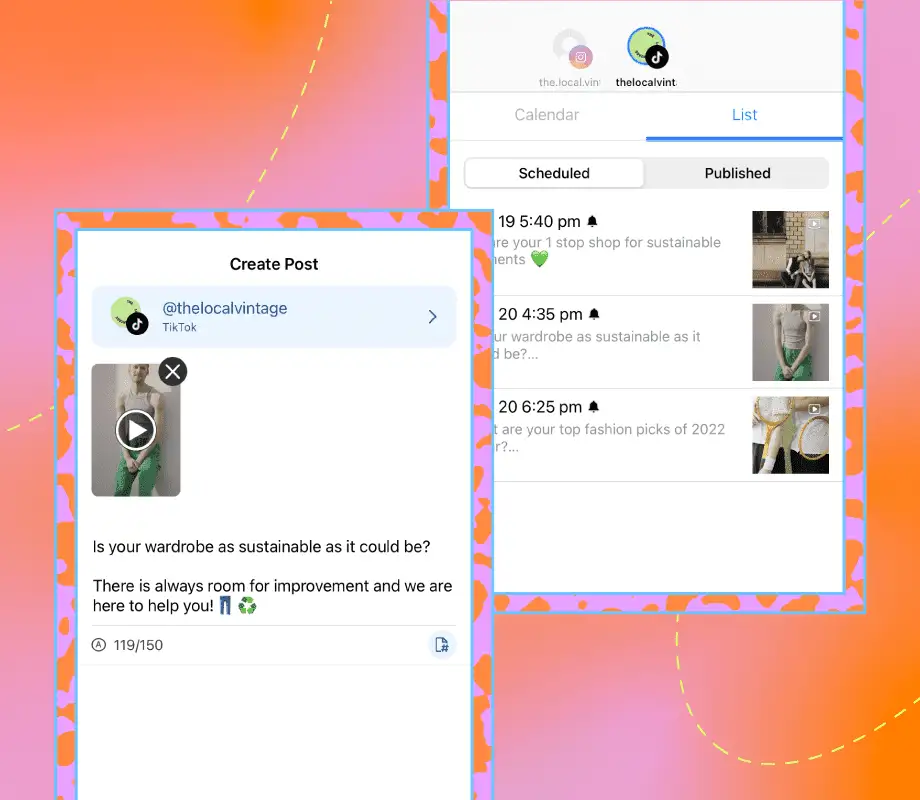
Drag and drop the content you'd like to schedule from your Media Library onto the content calendar. If you're scheduling to multiple platforms, you can customize each and set the publishing time for each channel.

Next, write your caption, include emojis if applicable, and insert relevant hashtags to help maximize your reach and engagement. To add design elements to your posts, tap "Edit Image" or "Edit Video." You can also use the crop tool to make sure your content meets each social platform's approved dimension sizes.

With Later's AI Caption Writer, you can generate captions in no time. Start a free trial today and get all the best tools and features you need to scale on social media.

Once your post is optimized, set the date and time you want it to go live and click "Save." For Auto Publish posts, your post will go live at your set time. For Notification posts, you will receive everything you need when it's time to post via the Later mobile app.

Ready to improve your social media workflow? Join over 7M social media managers, brands, and creators who trust Later for all their social needs. Get started today.

Best practices for scheduling social media posts

Scheduling social media posts is a major time-saver in its own right, but these six best practices will make your life even easier.

Create a consistent posting cadence

While "consistency" is the current buzzword, being consistent on social media is still the best way to grow on the app.

"The more consistent your posts, the more your audience will get to know you, which in turn builds trust. They'll also know what to expect from you, giving them a reason to follow and engage with your content," says Later's Social Media Manager, Christine Colling.

But how often should you post?

"Consistency doesn't have to mean posting every single day. Set your own pace and create a reasonable schedule, even if it means starting with just one or two posts a week," adds Christine.

In other words: it needs to be manageable.

So, determine what's achievable, experiment with different post types, and analyze your posts to see what content is working.

Organize your media library

Rather than storing your photos and videos on several different devices, use Later's Media Library to keep all your content stored, labeled, and accessible from a single place.

Think of it as a home for all of your social content. Plus, you can label, star, and segment your content so that you can find exactly what you need, when you need it.

You can upload and store as many photos and videos as you like. There's no limit.

Use notes as content placeholders

Just like a post-it note, Later's Calendar Notes feature helps you bookmark upcoming content before you have your images or videos ready, which is great for planning and keeping everyone on the same page.

Want to learn more? Here are our top 4 ways to use the Calendar Notes feature for your brand or business.

Share previews with stakeholders

If you have to get your social content approved before sharing, Later's Share Calendar feature is a game-changer.

No logins, accounts, or training needed. Just one shareable link with a preview of your social media feed and a view of your scheduled posts (media, caption, date, and time).

Save hashtags and keywords for quick access

Adding hashtags and keywords to your captions is still one of the best ways to increase your exposure.

With Later's Saved Captions, you can create curated lists of high-performing hashtags and keywords that you can add to captions in seconds.

You can even organize them by topics and social platforms.

Use Later's Hashtag Suggestions Tool when you need to source new hashtags for your posts.

Preview your feed before posting

Make sure your feed is consistent by using Later's free Visual Planner tool before you post.

You can rearrange your scheduled posts on desktop or mobile to find the perfect balance for your grid.

When you're happy with how your feed looks, click "Save Changes."

Later's Visual Planner helps keep your profile looking on point. Start your 14-day trial today.

FAQs

What is the best social media scheduler?

The best social media scheduler depends on your team size, platforms, and budget, but top options include Later, Sprout Social, Hootsuite, and Buffer. Later works well for visual-first brands and creators, while Sprout Social suits enterprise teams needing robust analytics. Buffer is ideal for small teams just getting started.

What do social media schedulers do?

Social media schedulers allow you to plan, create, and publish content across multiple platforms from one centralized dashboard. Instead of logging into each platform separately, you can batch your content creation, set publishing times, and let the tool handle distribution automatically.

Is there a free social media scheduler?

Yes, several social media schedulers offer free plans, including Later, Buffer, and Hootsuite, though features are limited compared to paid tiers. Free plans typically restrict the number of posts you can schedule or platforms you can connect, but they're a solid starting point for testing a tool.

Can I schedule posts to multiple platforms at once?

Yes, most social media schedulers let you schedule one post to multiple platforms simultaneously, customizing the content for each channel. This means you can tailor your caption length, hashtags, and even the image crop for each platform while managing everything from a single interface.

What is the best time to schedule social media posts?

The best time to schedule posts varies by platform and audience, but most schedulers include analytics to identify when your followers are most active. Later's Best Time to Post feature analyzes your specific audience data to recommend optimal publishing windows.

How far in advance can I schedule social media posts?

Most schedulers allow you to schedule posts weeks or months in advance, with some tools offering unlimited scheduling windows. This flexibility lets you plan seasonal campaigns, product launches, or content series well ahead of time.

Do I need a social media scheduler if I only manage one platform?

A scheduler can still save time even for one platform by letting you batch content creation and maintain a consistent posting cadence. You'll spend less time context-switching throughout the week and more time engaging with your community.

What is the difference between auto-publish and notification posts?

Auto-publish posts go live automatically at your scheduled time, while notification posts send you a reminder to manually publish the content. Notification posts are useful when a platform doesn't support direct publishing or when you want final control before posting.

Can social media schedulers help with content ideas?

Many schedulers now include AI-powered features that suggest captions, hashtags, and even content ideas based on your niche and past performance. Later's AI Caption Writer, for example, can generate caption options in seconds to speed up your workflow.

How do I measure the success of my scheduled posts?

Most social media schedulers include built-in analytics that track engagement, reach, and other metrics so you can see what content performs best. Look for tools that show performance trends over time, not just individual post stats, to inform your strategy.

Never Miss a Trend Again

Join over 1 million marketers to get social news, trends, and tips right to your inbox!

Email Address
Share

Plan, schedule, and automatically publish your social media posts with Later.

Related Articles

  • How to Schedule Instagram Posts and Set the Best Times (2026 Guide)

    By Monique Thomas

  • How to Schedule TikTok Posts With Later

    By Jillian Warren

  • How to Schedule a LinkedIn Post in 2025 (Ultimate Guide)

    By Amanda Demeku